
Appearance and language
Settings → Appearance. Six preferences, saved to your account rather than to the browser, so they follow you to every device you sign in from.
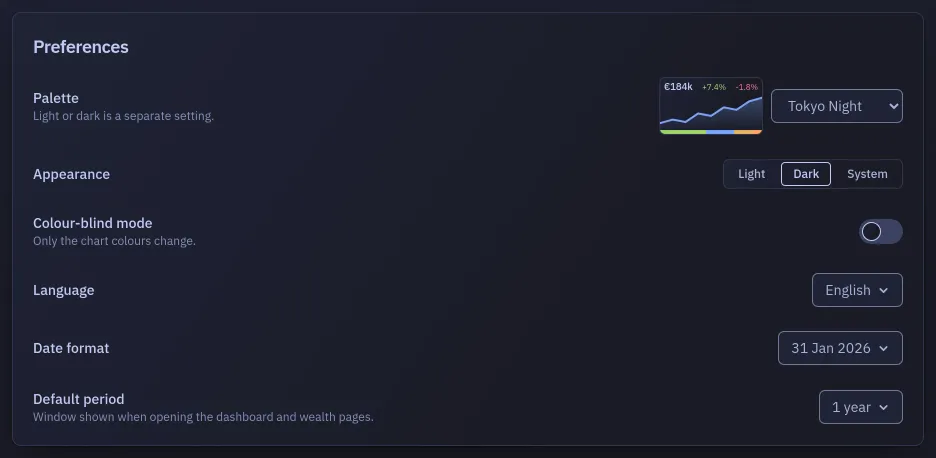
Palette
Section titled “Palette”Twelve colour schemes: Badlen, Minimal, Tokyo Night, Catppuccin, Dracula, Nord, Rosé Pine, Gruvbox, Solarized, GitHub, Ayu and High Contrast. A small preview beside the list shows an amount, a rise and a fall in the palette under the cursor, because the browser draws the open list and it cannot show colours of its own.
The palette is independent of light and dark: all twelve come in both, and picking one does not switch you from one to the other.
Appearance
Section titled “Appearance”Light, Dark, or System. System follows what your operating system reports and changes with it, including in the middle of a session.
Colour-blind mode
Section titled “Colour-blind mode”For readers who tell some colours apart poorly. A switch, off by default; turned on, it offers Protanopia (red looks dull), Deuteranopia (red and green look alike, the one it starts on) or Tritanopia (blue and yellow look alike), each a set of colours drawn for that sight. It replaces the colours of the wealth families and of the chart series, and nothing else: the background, the cards, the text and the accent stay the palette’s own. Each set is measured so that two families side by side in the ring stay distinct for that kind of sight, on all twelve palettes, light and dark. A strip beside the list shows the families as they will be drawn.
Language
Section titled “Language”French or English, and the whole interface switches at once. The strings for a language are fetched when you pick it, so the switch is a moment slower the first time and instant afterwards.
URLs stay French in both languages: /patrimoine is the wealth screen whichever one you read in.
Date format
Section titled “Date format”Three ways of writing a date, each shown as a real example rather than as a pattern:
- the one your language uses,
- day/month/year,
- year-month-day.
It only changes how dates are displayed. When you type one, a date field accepts whichever notation you use and shows the day it understood.
Default period
Section titled “Default period”The window the dashboard and an account’s performance view open on, among ten: 1 day, 7 days, 1 month, 3 months, year to date, 1 year, 2 years, 3 years, 5 years, and everything. It is a starting point only, and changing the window on a page does not change this preference.