
Journey
/parcours lays your life against your wealth: when an account was opened, when a home
was bought, when a loan ends, when a child was born, when you mean to retire. The page is
Journey in the menu, under Analyse, and its marks on the charts are called
markers.
Most of it fills itself. Your accounts, loans, goals and profile already carry dates, and the page reads them on every visit rather than keeping a copy, so correcting an opening date corrects the timeline with it. What no record dates, a marriage, a job, a move, you add yourself.
Dates already known
Section titled “Dates already known”| Taken from | What appears |
|---|---|
| An account | Its opening; its closure, on the Closed on day of its Settings tab |
| A property | Its purchase, with its address; outside the main home, the 22 and 30 years after which a gain owes no tax then no levies |
| A loan | A period from its first instalment to the end of its schedule |
| A PEA, a life cover | The day it reaches 5 or 8 years, the same count the advice page makes |
| A dated goal | The month it falls due |
| Your profile | Your birth; your retirement, at the age you chose; 67, the age of the automatic full-rate pension |
| An event you added | A child’s coming of age at 18; a gift’s allowance coming back fifteen years later |
The retirement age is a field of your profile (Settings, You). Left empty, the page uses the legal age of your generation where Badlen knows it, and marks the date as estimated. Without a date of birth there is no retirement on the page, and no age axis.
A derived item you would rather not see is hidden with the eye at the end of its row, or on a phone with Hide on the unfolded row; it is corrected at its source, never here. It disappears at once from the timeline, Coming up and the charts. Its row stays on screen, greyed out, until you leave the page: the open eye, or Show again, brings it back. Show them all again, under the list, brings every hidden one back.
Events you enter
Section titled “Events you enter”Add an event opens the form. A category, then a type: family (a child’s birth, a civil partnership, a marriage, a separation, a bereavement, an inheritance, a gift), study and work, housing, big purchases, or other. The type decides whether the event is a moment or a period: a job, studies or a rental take an end, or stay Ongoing.
- Short note, sixty characters: a first name, a street. It follows the type, as in “Birth of a child · Léa”.
- Date, as a day, a month or a year, with Approximate date for “around 2010”. A month or a year is placed on the first day of it on the charts, and the form says so.
- Linked account or property, optional: the marker then also appears on that account’s chart.
- Show on charts, on by default: turned off, the event appears on the timeline only.
No amount is asked for. A note can hold one, “Second-hand, €9,500”, and it is masked with every other amount when you hide them.
The page
Section titled “The page”From the top: Coming up, four tiles for the next goal, the next tax threshold, the next loan to end and your retirement, each with how far away it is. Then the timeline: the years and your age across the top, a lane per category under them, today as a line and what lies ahead hatched. Whole life, Last 20 years and Ahead change its span; the boxes above it choose its lanes. A filled dot is past, a hollow one ahead, a dotted outline approximate. Dots too close to tell apart share one, numbered and named by the dates it spans. Then the chronology, everything as a list: ahead first, then the past by year. Each side opens on the 20 events nearest today, and Load the next ones shows more.
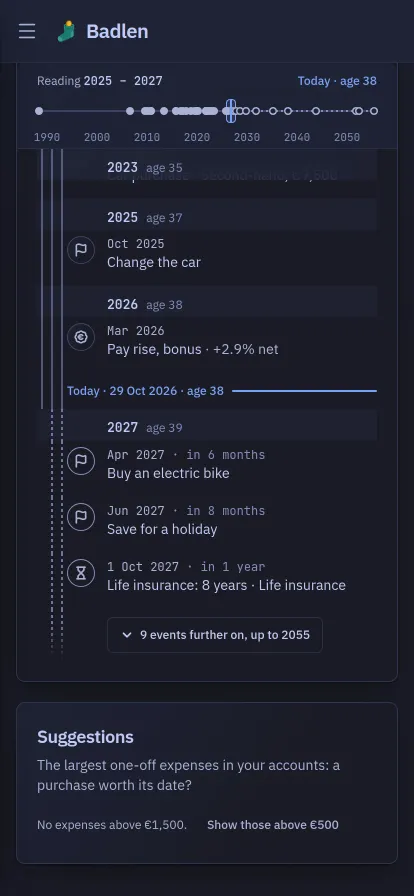
On a phone the timeline and the chronology become one thread, time running down from the past to the future, and the page opens on today. The past comes 20 events at a time as on a wide screen, the older ones behind Earlier at the top; then today’s line with your age, and the year ahead, nearest first. What lies more than a year ahead is folded behind further on at the bottom. Each period is a rail in the left margin, from its start to its end, dotted where it lies ahead, and its end has a row of its own. The year and your age stay at the top of the screen as you scroll.
Above it, a strip shows your whole life on one line, today, and the years you are reading. A tap on the strip takes you to that year; from the keyboard, the arrows step from one year to the next. Coming up is not there: each row ahead says how far away it is. A tap on a row unfolds it onto where it comes from, then Edit and Delete for an event you entered, or Hide and a link to its source for an item drawn from your data. The boxes fold behind Categories.
Markers on the charts
Section titled “Markers on the charts”The same events appear as markers under three charts: the portfolio chart of Evolution, the net-worth card of the overview and the curve of Projections, as well as on an account’s own Performance chart for what is linked to it. A dotted line crosses the chart and a button sits under the axis; two markers too close to tell apart share one, numbered. Hovering or focusing it shows what happened and what the curve did that month.
On Evolution, clicking or tapping a point of the curve, or reaching it with the arrow keys once the chart has focus, offers Add a marker in that month: the form opens with the month filled in.
Markers above each chart chooses which categories show, and the choice is the same one the timeline’s boxes make: tick one here and it is ticked there. It is kept in your browser. By default, charts leave out account openings and goals, which say nothing the curve does not already show. On a phone the button shows a signpost beside its count, so the chart’s controls hold one row.