
Your safety net
The safety cushion is the money you keep available to absorb the unexpected, before any investment. It comes down to two figures, which the rest of the application reuses.
Its place on the Goals screen
Section titled “Its place on the Goals screen”The card sits at /objectifs, above your projects, under the heading Your base. No account page
leads here, and nothing else in the application asks for it: the card is the only place the question
is put.
With no cushion stated, the card offers Set up my safety cushion, and says what it needs: “Two figures are enough: what a month costs you, and how many months you want covered.”
State it
Section titled “State it”-
Monthly expenses: what a whole month costs you, rent and groceries included.
-
Months covered: a slider from 0 to 12. The dialog shows the target amount as you move it.
-
Account funding it: one account, and only a current account or a savings passbook: “A single account, with no risk to the capital and available at once.” A PEA cannot fund a cushion.
-
Save.
Reading the result
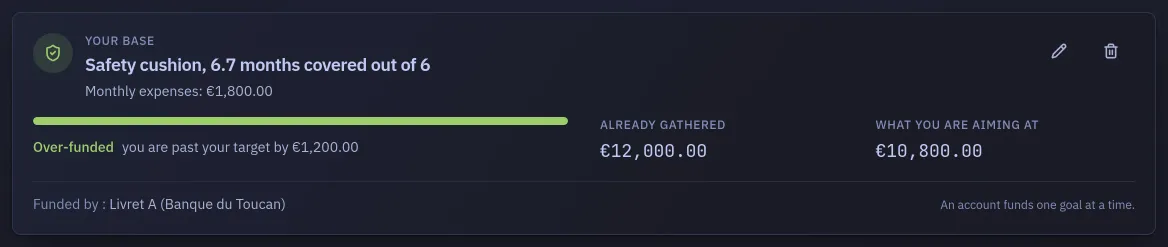
Section titled “Reading the result”Once stated, the card reads “Safety cushion, N months covered out of M” and judges the
coverage against three bands, which come from the course shipped with the product, at
/apprendre, which Learn describes:
| Months covered | How it reads |
|---|---|
| Under 3 | You are exposed: the first thing to build, before any investment |
| 3 to 9 | You are covered |
| Over 9 | That is a lot: part of this savings is asleep |
Pick no account and the card cannot say anything: “No account linked: link one to know how many months you really cover.” The months come from the linked account’s balance, not from your net worth.
The dashboard tile, and the Advice page
Section titled “The dashboard tile, and the Advice page”Two other places use these two figures: the emergency-fund tile on the dashboard, and the advice at
/conseils, which is where the recommendation to top it up or to stop feeding it comes from. Until
the cushion is stated, both can only invite you to state it.