
Simulators
Simulators, at /outils, holds eleven calculators in one place: a rail lists them,
the selected one fills the panel beside it, and the address names it. Each has its own URL,
so one can be bookmarked or linked to directly.
They are scratch pads that work on the figures you type, and only one of them reads your accounts.
Eleven calculators, one by one
Section titled “Eleven calculators, one by one”The rail files them under the three questions a reader arrives with, and the table below follows it: growing a capital, then an income and what it still buys, then borrowing.
| Family | Simulator | What it answers | Address |
|---|---|---|---|
| Growing a capital | Wealth simulator | The monthly passive income your wealth could pay, after tax and inflation. | /outils/simulateur-patrimoine |
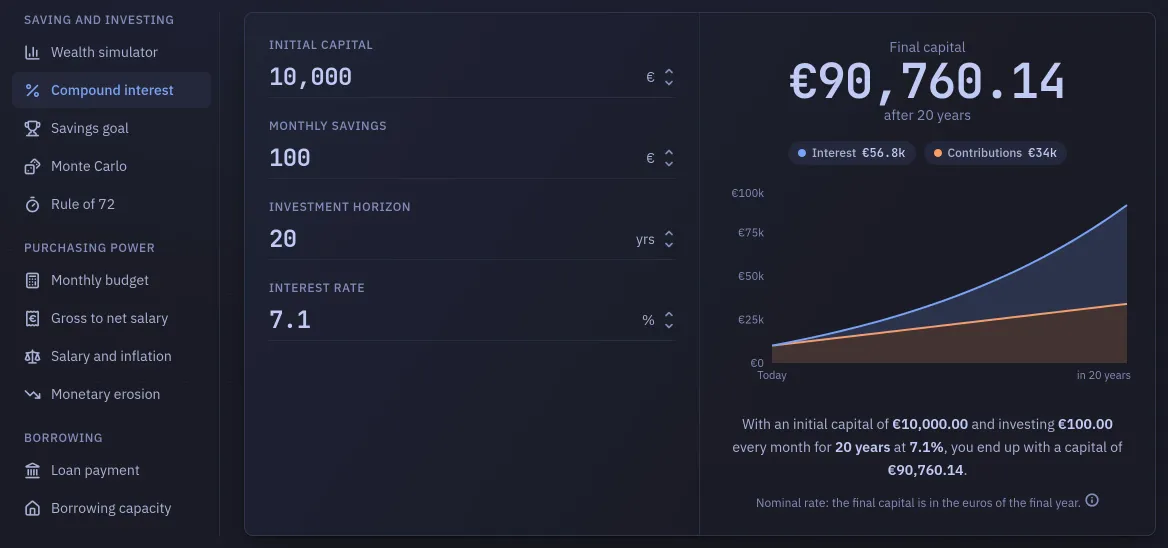
| Growing a capital | Compound interest | What an initial capital plus a monthly effort becomes at a given rate. | /outils/interets-composes |
| Growing a capital | Savings goal | The monthly saving needed to reach a target by a date. | /outils/objectif-epargne |
| Growing a capital | Monte Carlo | The same projection, replayed across 3,000 randomly drawn markets. | /outils/monte-carlo |
| Growing a capital | Rule of 72 | Roughly how long a capital takes to double. | /outils/regle-72 |
| Income and purchasing power | Monthly budget | A budget drawn as a flow, from figures you type. | /outils/budget-mensuel |
| Income and purchasing power | Gross to net salary | What is left of a French private-sector salary once employee contributions are taken. | /outils/salaire-brut-net |
| Income and purchasing power | Salary against inflation | What your salary still buys, against the consumer prices Insee has published since 1996. | /outils/salaire-et-inflation |
| Income and purchasing power | Monetary erosion | What inflation takes from a capital’s purchasing power. | /outils/erosion-monetaire |
| Borrowing | Loan payment | A monthly payment and what a loan costs in total. | /outils/mensualite-pret |
| Borrowing | Borrowing capacity | How much you could borrow, from your income and your existing debts. | /outils/capacite-emprunt |
The addresses stay French: they are bookmarked and linked from the course shipped with
the product, at /apprendre, which Learn describes.
The last two were one entry, /outils/pret-immobilier, with a chip switching between the
two halves, and the rail never named the second one. That address still answers:
it redirects to /outils/mensualite-pret, the half it used to open on.
Their assumptions
Section titled “Their assumptions”The two that project a capital forward, Compound interest and Savings goal, work in nominal euros: the result is in the euros of the final year, not today’s. The rate you type is an effective annual rate, and monthly contributions are invested at the end of each month. Each card says so under its result.
Wealth simulator does the opposite: it deflates by its own inflation field, so its amounts are in today’s euros.
Monte Carlo makes up for a weakness all the others share. They compound one average, and an average almost never happens: two portfolios with the same average return end one broke and one rich, depending on whether the bad decade falls early or late.
Salary against inflation assumes nothing at all: it is the only simulator whose figures come from measured history rather than from a rate you type. It never projects a future price, which is why no inflation field appears on it, and it stops at the last month the index has been published for: the screen names that month, and a salary change made after it is drawn on the chart and left out of the figures.
Gross to net: who it covers
Section titled “Gross to net: who it covers”Gross to net salary is the one simulator whose answer does not hold for everyone, so it says who it holds for under the amount it shows.
It covers an employee of the private sector under the general scheme: a French contract in mainland France, paid monthly, executive (cadre) or not, full time or part time. For that reader it reproduces the payroll model the Urssaf publishes as free software, case for case.
It does not cover the public sector, the self-employed, apprenticeship and professional training contracts, interns, the agricultural scheme, the overseas departments, expatriate and inbound assignees, or any industry whose collective agreement adds a contribution of its own. The screen does not ask your scheme: it computes one, and a list whose other two choices could only lead to a refusal would be no better than not asking. The sentence under the result names the employee it covers and the two readers the figure would be wrong for, where that figure is read: public pay is not private pay with three more rates, and a self-employed person’s contributions are charged on professional income rather than on a salary.
The gross is typed by the hour, by the month or by the year, whichever you have: the three boxes are one amount, and typing in any of them moves the other two. The hour is counted on the legal week of 35 h, which is 151.67 h a month, and the screen says so under the boxes. A contractual share below 100 % cuts those hours, and with them the monthly amount; it leaves the hourly rate itself alone. The net is readable in all three units too.
Two costs are left empty rather than set to zero, and the result says so until you fill them: your company health cover, which has been compulsory in the private sector since 2016 and is therefore never nil, and your income tax withholding rate, which is printed on your own payslip. The rate is never guessed: the default scale is voted every year, and you would be tempted to trust an estimated one.
The schedule itself is dated. Payroll rates move every 1 January, so the day they took effect is printed under the result, the texts behind each line are listed beside it, and a test in the suite goes red when the shipped schedule is old enough that a new one has certainly been published.
Your figures, and where they live
Section titled “Your figures, and where they live”Every simulator but Monte Carlo starts from defaults and keeps whatever you type in this browser, so a calculator you come back to is where you left it. That storage is local: it is not saved to your account, does not follow you to another device, and is not part of any export or backup.
Monte Carlo is the exception twice over: it reads your current net worth as its starting capital, and it keeps nothing. You can type over that figure, and nothing is written back to your accounts.
The one figure that comes from outside
Section titled “The one figure that comes from outside”Salary against inflation reads a price series published by Insee: indice des prix à la
consommation, series 011814630, base 2025, all households, one value a month from
January 1996. It is the French index and not the harmonised European one, which is what a
reader checking the figure against the news will find; over a seven-year window the two
have reported cumulative inflation as much as 3.4 points apart.
That series ships inside the application. Nothing is fetched when you open the tool, so
a self-hosted instance with no outbound access keeps it whole, and the list of services
this server contacts stays the one Where the data comes from
gives. The cost is a file somebody has to refresh: pnpm price-index refetches it from Insee and
rewrites apps/web/src/components/tools/priceIndex.ts, pnpm price-index:check fails if
the two no longer match, and a scheduled job runs that check on the 20th of each month.
A unit test goes red on its own four months after the last month in the file, so a forgotten
refresh is caught without anyone watching a calendar.
It starts in 1996 because Insee’s older index is a different one rather than another scale of the same: splicing them would invent a figure at the join and would move the 2022 inflation peak retroactively. Months before January 1996 are not offered.
This screen is unrelated to Budget, which reads your real current accounts. The simulator knows only what you type into it.