
Goals
A goal sets money aside for a one-off project: a deposit, a car, a holiday. It has a target amount, a date, and the accounts whose balances count towards it.
Goals live at /objectifs, under Goals in the navigation. The screen has two halves:
Your base, which is the safety cushion covered by Your safety
net, and Your projects below it.
Create a goal
Section titled “Create a goal”-
New goal, beside the section heading. With no goal yet, the empty state offers three ready names instead (Secure a deposit, Buy a car, Plan a holiday), and picking one opens the same form with the name filled in.
-
Icon and name. The square to the left of the name field opens twenty icons.
-
Target amount.
-
Horizon, on a single slider: one month to twenty-four months, then three to thirty years. The matching date is printed under the handle as you drag.
-
Regular contribution (optional): an amount and a frequency, per week, month, quarter or year. Enter both or neither: an amount with no frequency cannot be projected, and the form refuses one without the other.
-
Linked accounts, covered below.
-
Save. The button stays disabled until the name and the target amount are both filled.
Linked accounts: one rule
Section titled “Linked accounts: one rule”The Linked accounts list in that form is the only place an account is attached to a goal. Nothing on an account’s own page links it to anything.
It lists every account you hold except loans: a passbook, a PEA, a wallet, crowdlending and a life-insurance contract are all accepted, because a goal is funded by a balance, and a debt’s balance subtracts. Archived accounts are left out.
The order of the list
Section titled “The order of the list”The projects do not arrive in the order you created them. What has slipped comes first, then what falls due soonest, then what has no date, then what is already reached, so the row that needs you is the first one you read. That is the Suggested order, the default.
Sort by, beside New goal, offers three others: Date reached, Progress and Status. Date reached is the month the contributions get there, not the date you set, and a project with no such month goes last rather than out of the list. The control appears only from two projects upwards, since a single row has nothing to sort.
Reading a goal card
Section titled “Reading a goal card”Each goal shows what its accounts hold against the target, a percentage, and a standing: Running, Goal reached, Past its date, or No date. With a contribution entered, it adds the month the target would be met: “At this rhythm… This adds up your contributions and nothing else: no return is assumed.”
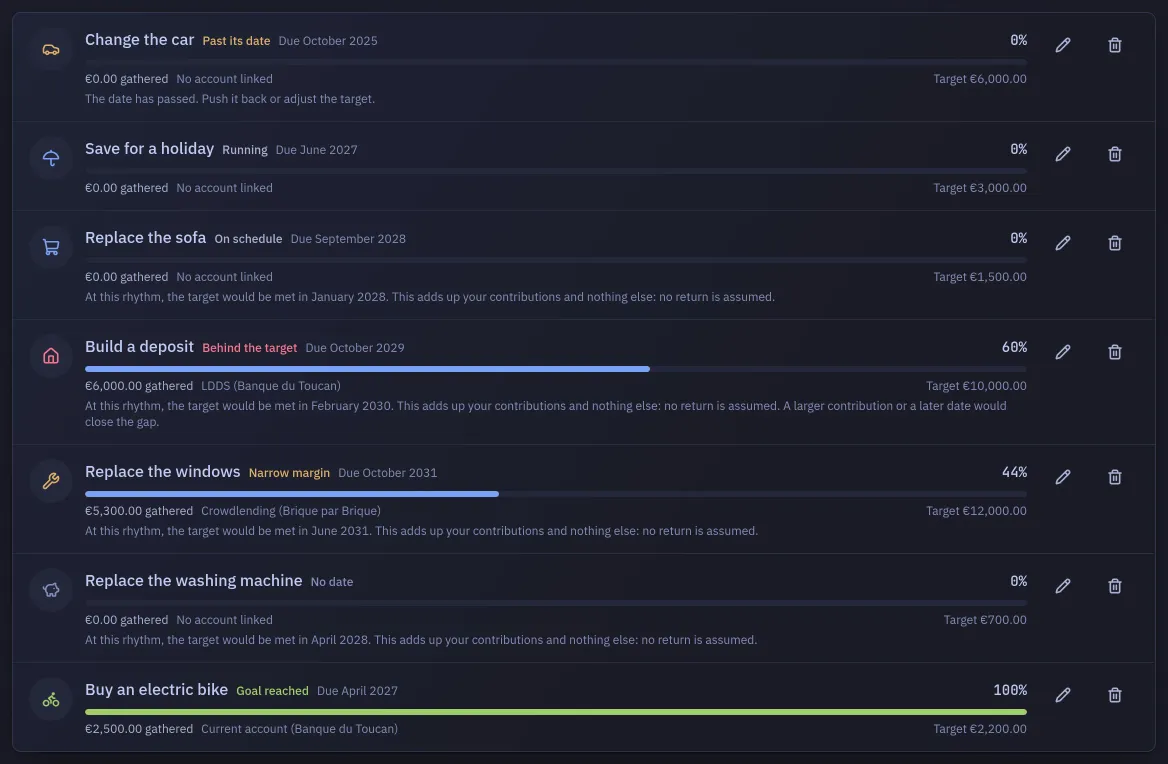
Badlen then compares that projected month with the date you set, and the result replaces Running as the standing: On schedule when the contributions land with room to spare, Narrow margin when they land inside the last tenth of the horizon, Behind the target when they land after it. The margin is a tenth of the horizon rather than a fixed number of months, because three months is nothing on a twenty-year goal and a lot on a one-year one. Behind the target, the card adds the only two levers there are: “A larger contribution or a later date would close the gap.”
With no contribution entered there is nothing to project and nothing is invented: the card stays Running and shows no month at all. A goal already reached, or one past its date, keeps its own standing: the first has nothing left to cover, and the second is already settled.
With no account linked, the card can only show “No account linked” and 0 %. Gathered across your projects, beside the section heading, totals every linked account once.
Deleting a goal erases the goal alone: “Your accounts and their balances do not move.”